Every software project eventually drowns in its own management overhead. Jira boards with 400 stale tickets. Sprint retrospectives where nothing changes. Slack threads where decisions go to die. Status meetings that could have been a commit message.
We stopped doing all of that.
Across three production applications — a 26-phase education platform, a sports prediction engine with machine learning, and an AI connectivity hub with 211 modules — we manage everything through a system built directly into Claude Code itself. No external project management tools. No meetings about meetings. Just structured files, automatic tracking, and an AI assistant that never forgets where it left off.
Here's exactly how it works.
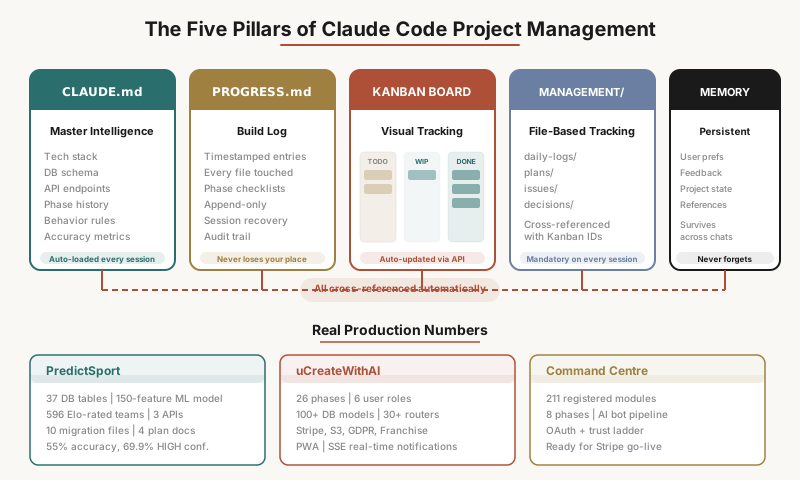
CLAUDE.md — The Master Intelligence File
Every project starts with a single file: CLAUDE.md. This isn't a README. It isn't documentation for humans to skim and forget. It's the master intelligence file that Claude Code reads at the start of every single session.
Think of it as the project's brain. It contains everything Claude needs to pick up exactly where it left off:
- The complete tech stack and architecture decisions
- Database schema references and migration history
- Every API endpoint, what it does, and how it's authenticated
- The full feature vector for ML models (150 features across 8 categories in our sports prediction app)
- Environment variables and deployment configuration
- The complete phase history — what was built, when, and why
- Current accuracy metrics, data coverage tables, and performance benchmarks
- Explicit behavior rules for how Claude should operate in this project
In our sports prediction application, PredictSport, the CLAUDE.md file is over 850 lines. It tracks 37 database tables, three external APIs with their rate limits and authentication patterns, an ensemble ML model with XGBoost + LightGBM + Logistic Regression, Elo ratings for 596 teams computed from 26,435 historical fixtures, and a Monte Carlo World Cup simulator.
When Claude opens this project, it doesn't ask "what are we building?" It already knows. It reads the file, checks the current state, and says "here's what we need to do next."
The key insight is that CLAUDE.md isn't static documentation — it's a living specification that gets updated every time significant work is completed. Phase history grows. Accuracy metrics update. Coverage tables reflect the latest data pulls. The file evolves with the project.
PROGRESS.md — The Automatic Build Log
Every project includes a PROGRESS.md file that serves as a timestamped, append-only build log. Every time Claude creates or modifies a file, it logs a line:
- [2026-03-27 14:04] ran config/discover_sportmonks.py — 27 season IDs discovered
- [2026-03-27 14:37] fixture_statistics: 3,782 to 12,198 (5,000 API calls)
- [2026-03-29 23:36] retrained model: ensemble-v1-20260330 — 55% overall, 65% HIGH, Brier 0.5512
- [2026-03-30 12:05] created frontend/admin.html (Kanban board + data coverage + ingestion log)
This solves one of the hardest problems in AI-assisted development: session recovery. Claude Code sessions can end unexpectedly — context windows fill up, connections drop, machines restart. When the next session starts, Claude reads PROGRESS.md, sees every file that was touched and when, checks which ones exist, and continues from the last incomplete step.
No "where were we?" No re-explaining the project. No lost work.
PROGRESS.md also doubles as an audit trail. You can look back at any date and see exactly what happened: which scripts ran, what data was ingested, what models were retrained, what features were shipped. It's better than git log because it captures intent, not just diffs.
THE KANBAN BOARD — Visual Progress Tracking in Real Time
This is where project management becomes visible. Every application we build includes a Kanban board — not in some external tool, but built directly into the application itself.
In PredictSport, the Kanban board lives at the /admin route, backed by a kanban_tasks database table with full CRUD API endpoints. In our education platform ProcessEd, it's a dedicated DevKanbanTask model with a tRPC router at /portal/admin/dev-kanban.
What makes this different from a normal Kanban board is that Claude Code updates it automatically as work happens:
- Before starting any task, Claude creates a Kanban card via API if one doesn't exist
- When work begins, the card moves to "In Progress" automatically
- When work completes, the card moves to "Done" with notes describing exactly what was accomplished
- If something is blocked, the card reflects that with an explanation
- Plan files and daily logs are linked directly in the card's notes field
The owner can also add tasks manually. At the start of every session, Claude checks the board for any new cards the owner added — feature requests, bug reports, priority changes — and incorporates them into the work plan.
The result is a visual, always-current view of the entire project state. You open the admin page and see exactly what's in progress, what's done, what's blocked, and what's queued up next. No stale tickets. No forgotten cards. Everything stays in sync because the AI that does the work is the same system that updates the board.
THE MANAGEMENT FOLDER — Plans, Daily Logs, Issues, and Decisions
Every project includes a management/ folder (or Claude Management/ in Next.js projects) with four subdirectories:
- daily-logs/ — Session reports written at the end of each work session, documenting what was built, what changed, what works, what's broken, and what to pick up next
- plans/ — Detailed implementation plans saved before any code is written, with file naming like 2026-03-26_enhanced-prediction-model.md
- issues/ — Bug reports and problem descriptions that Claude scans at the start of every session
- decisions/ — Architecture decision records explaining why certain approaches were chosen
These aren't optional documentation tasks. They're mandatory rules written directly into CLAUDE.md. Claude cannot start writing code for a plan without first saving it to the plans folder. It cannot end a session without writing a daily log. It cannot ignore a file in the issues folder.
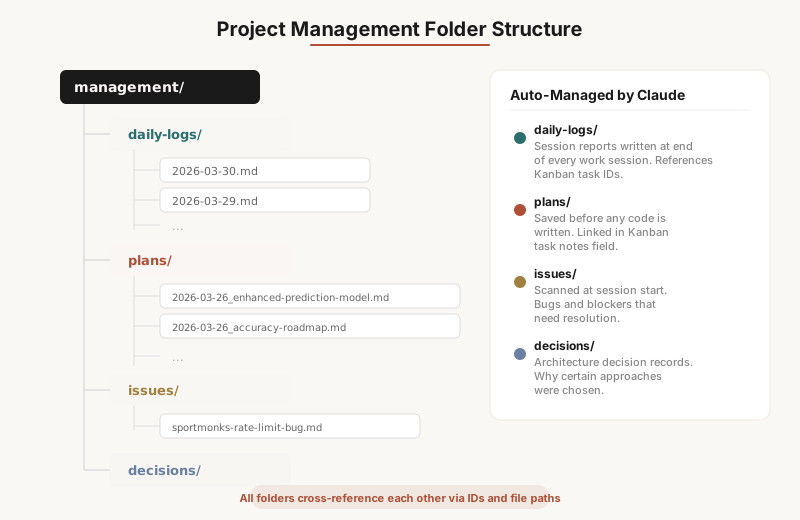
The management folder is cross-referenced with everything else. Kanban task notes contain file paths to plans and logs. Daily logs reference Kanban task IDs. Plans reference the tasks they belong to. PROGRESS.md tracks every file touched. It's a web of traceability that would take a human project manager hours to maintain, but happens automatically because the rules are encoded in the project itself.
PERSISTENT MEMORY — Context That Survives Between Sessions
Claude Code has a persistent memory system that stores information across conversations. This isn't just chat history — it's structured knowledge organized into categories:
- User memories — Who the project owner is, their preferences, their role, how they like to work
- Feedback memories — Corrections and guidance that should never be repeated. "Don't mock the database in tests." "Blog headers use bold text, not markdown headings." "All compliance reports must come from real database data, never templates."
- Project memories — Current state of ongoing work, priorities, what's blocked, what's next
- Reference memories — Where to find external resources, which Slack channel has feedback, where bugs are tracked
In practice, this means Claude remembers that one project uses Haiku for cost-efficient classification tasks and Sonnet only where reasoning is truly needed. It remembers that another project's compliance documents must be generated exclusively from real database data — never AI-guessed content. It remembers that the project owner is in Gainesville, Florida, not Glasgow.
These aren't preferences you set once. They accumulate naturally as you work. Every correction, every "no, do it this way instead," every architectural decision becomes persistent knowledge that shapes future sessions.
THE UNIFIED TRACKING SYSTEM — Everything Links to Everything
The real power isn't in any single piece. It's in how they all connect.
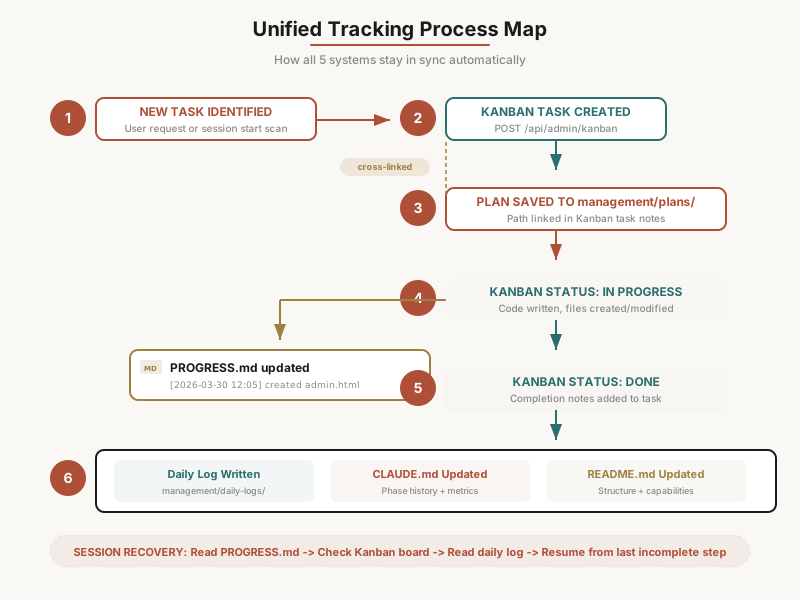
When a new feature needs to be built, here's what happens automatically:
- 1.A Kanban task is created via the API with the feature title and description
- 2.A plan file is written to management/plans/ with the full implementation approach
- 3.The plan file path is linked in the Kanban task's notes field
- 4.The Kanban task moves to "In Progress" when work begins
- 5.As code is written, PROGRESS.md gets timestamped entries for every file created or modified
- 6.When the feature is complete, a daily log captures the session summary with the Kanban task ID
- 7.The Kanban task moves to "Done" with completion notes
- 8.CLAUDE.md's phase history section is updated with what was built and the current metrics
- 9.README.md is updated if the feature changes the project structure or capabilities
If the session drops mid-feature, recovery is straightforward: Claude reads PROGRESS.md, checks the Kanban board for in-progress tasks, reads the latest daily log, and resumes from the last incomplete step. No context is lost. No work is duplicated.
This is how we went from zero to 26 completed phases in a single education platform — including in-person class scheduling, Stripe payments, GDPR compliance, AI work review pipelines, franchise portals, and a full support ticket system — without a single sprint planning meeting.
Real Numbers From Real Projects
This isn't theoretical. Here are the actual metrics from applications managed entirely through this system:
PredictSport (sports prediction engine):
- 37 database tables, 10 migration files
- 150-feature ML model retrained weekly with automatic accuracy tracking
- 55% overall prediction accuracy, 69.9% on high-confidence picks
- 596 teams rated via Elo from 26,435 historical fixtures
- 7,500 API calls budgeted and tracked per day across three external APIs
- Full data coverage audit tables maintained in CLAUDE.md showing per-league completion percentages
uCreateWithAI (education platform):
- 26 phases completed across 6 user roles
- 100+ database models, 30+ tRPC routers
- Features spanning course management, Kanban boards, calendars, assessments, certificates, Stripe payments, S3 storage, email notifications, GDPR compliance, franchise portals, and PWA support
- Every phase documented in CLAUDE.md with exact dates, models added, and components built
Command Centre (AI connectivity hub):
- 211 registered modules across 8 phases
- AI bot pipeline with governor flow and trust ladder mechanics
- OAuth integration patterns, direct execution API, skill packs
- Beta system built and ready for Stripe go-live
How Ucreatewithai Helps Companies Build This Into Every Application
This system didn't happen by accident. It's a methodology we teach and implement at uCreateWithAI.
Most companies start an AI-assisted development project by opening a chat window and typing "build me an app." They get code. They lose context. They start over. They waste months.
We help businesses and individuals structure their Claude Code projects from day one — setting up CLAUDE.md files that capture architecture decisions, PROGRESS.md logs that enable session recovery, management folders that keep plans and issues organized, and Kanban boards that make progress visible to everyone on the team.
Whether you're a solo founder building your first SaaS product, a small business automating operations, or an enterprise team adopting AI-assisted development, the management infrastructure matters as much as the code itself. Without it, you have a collection of files. With it, you have a self-managing project that an AI can pick up, understand, and advance — every single session.
Through our consulting engagements and self-paced courses, we teach teams how to:
- Structure CLAUDE.md files that scale from prototypes to production applications
- Build automatic Kanban boards directly into their applications
- Set up persistent memory systems that capture institutional knowledge
- Create daily log and plan archival workflows that survive session drops
- Design recovery protocols so no work is ever lost
- Encode project rules as behavior instructions that Claude follows without reminders
The result is that every application you build with Claude Code becomes self-documenting, self-tracking, and self-recovering. The AI doesn't just write your code — it manages the entire lifecycle of your project.
If you want to build software this way, that's exactly what we're here for.
The Bottom Line
The old model of software project management — tickets, sprints, standups, retrospectives — was designed for a world where humans did all the work and needed coordination rituals to stay aligned.
AI-assisted development doesn't need coordination rituals. It needs structured context. Give Claude Code a well-maintained CLAUDE.md, a PROGRESS.md build log, a Kanban board with API access, and a management folder with linked plans and issues, and it will manage itself better than most teams manage themselves.
The management overhead drops to near zero. The context loss drops to zero. The time spent on "where were we?" drops to zero.
You just build.
Get posts like this in your inbox
No spam. New articles on AI strategy, governance, and building with AI for small business.
Keep Reading
Tutorial: How to use Claude Code to automate your weekly reporting in one afternoon
You spend Friday afternoon compiling numbers from three systems into a report nobody reads until Monday. Here is how to automate the entire thing and get your Friday back.
How to set up CLAUDE.md for your project: a practical guide with real examples
CLAUDE.md is the file that tells Claude Code how to behave in your codebase. Here is exactly what to put in it, what to leave out, and why the decisions matter.
What happens when you give a CEO Claude Code for a week. Five patterns I see every time.
I have trained over a dozen executives to use Claude Code. The same five things happen every time, in roughly the same order. Here is the pattern.